
Y999 Game is a real-money casino app for Android players in Pakistan. Your login connects you to your wallet balance, game history and any pending withdrawals, so getting in quickly and securely matters. Most login problems come from a small number of causes, and each has a simple fix.
How to Log In Y999 Game?
Open the Y999 Game app and tap the login button on the home screen. Enter the mobile number you used at sign-up without the leading zero, since the +92 code is already filled in. Type your password and tap log in. If you’re on your own phone, the app can keep you signed in so you don’t have to repeat this every session.
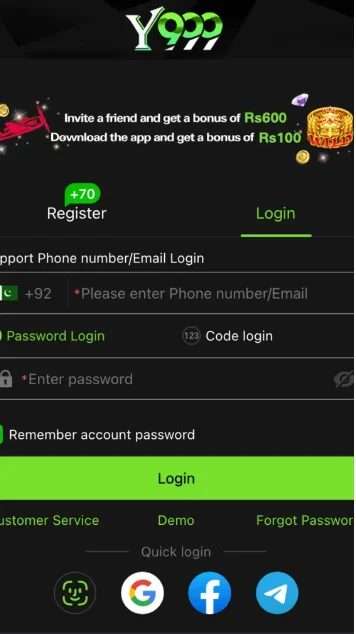
When Login Fails
“Incorrect number or password.” Check that you haven’t typed the zero at the start of your number. Passwords are case-sensitive, so make sure caps lock or auto-capitalization isn’t changing the first letter.
Forgotten password. Tap “Forgot password” and enter your Registered number. You’ll receive an OTP by SMS. Enter it within the time limit and set a new password.
OTP not arriving. Confirm your SIM has signal and that the number matches your account. Wait a minute before requesting another code, because repeated requests can trigger a temporary block.
App crashes on the login screen. Usually this is an outdated APK. Download the latest version from Y999GameAPKs.com.pk and install it over the old one. Your account data stays on the server, so nothing is lost.
Keeping Your Account Safe
Never share your OTP with anyone, including people claiming to be support staff. Use a password you don’t use for JazzCash, Easypaisa or email. Log out when using a shared phone.
Real-money gaming carries financial risk. Only play with money you can afford to lose, and take breaks if a session stops being fun.
Frequently Asked Questions
Can I log in on two phones?
You can, but logging in on a new device may require OTP confirmation.
Can I change my registered number?
This usually needs a request through in-app customer support.